Simple. Compliant. Complete.
Digital Work Time Tracking – Easy, Accurate & Ready for Your Team
No more spreadsheets. No more double data entry. marble work tracks your working hours accurately and in full compliance – start time, breaks, end of day. And your project time runs right alongside it. One tool. One overview. Zero chaos.
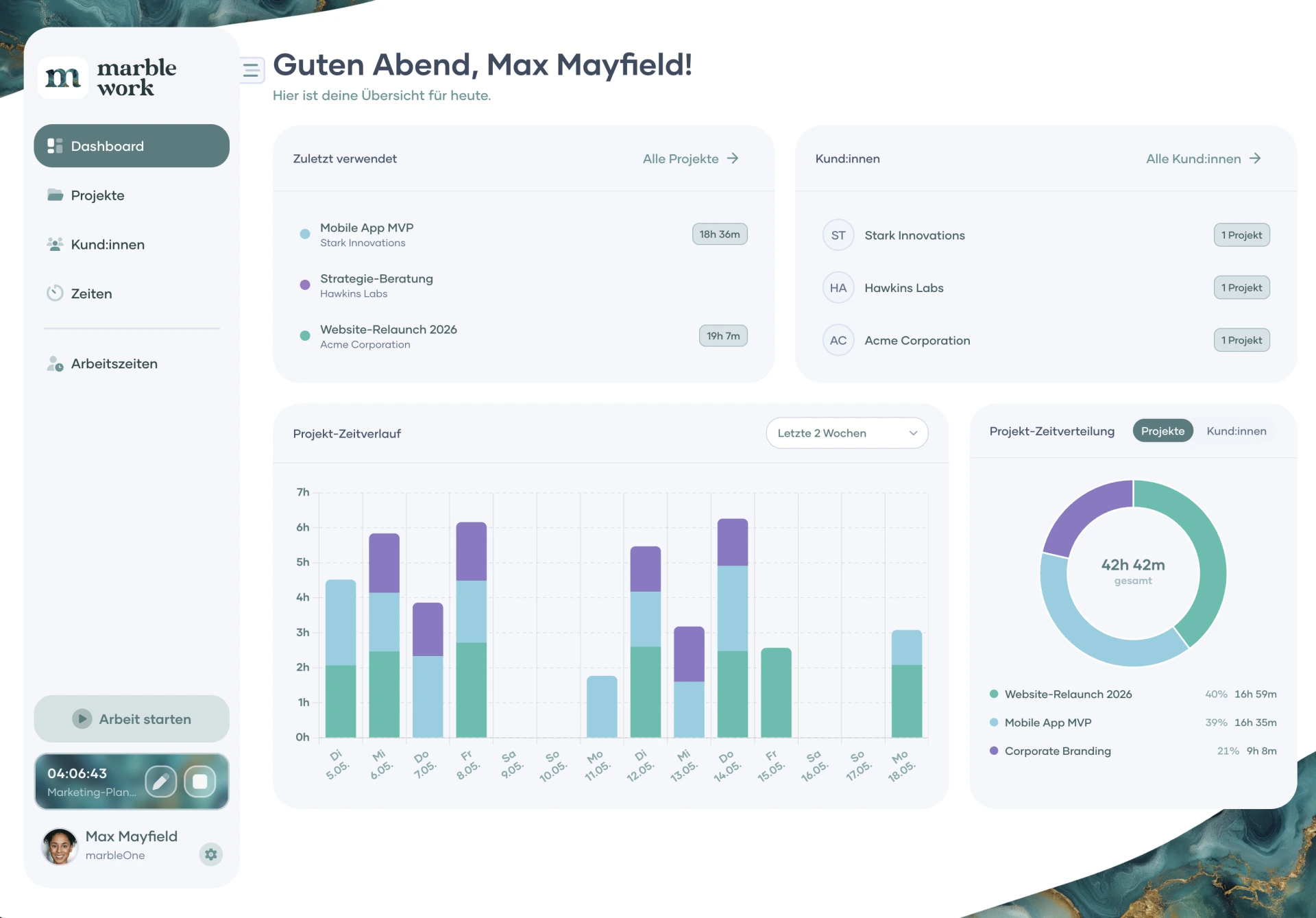
It's that easy
See how work time tracking looks with marble work
Log in, start the timer, track your break, clock out – done in a few clicks. marble work makes digital work time tracking a seamless part of your daily routine. No app download, no learning curve.
A modern time-tracking experience
Why marble work for your work time tracking?
Spreadsheets, punch clocks, and separate tools are a thing of the past. marble work combines work time tracking and project time tracking in a single interface. Stay on top of attendance, breaks, and logged hours – and link them directly to your projects. Always know exactly where your time goes.
Work time tracking becomes a clear, reliable process – not a daily chore.
Your brand, your tool
Time tracking software featuring your brand's corporate design
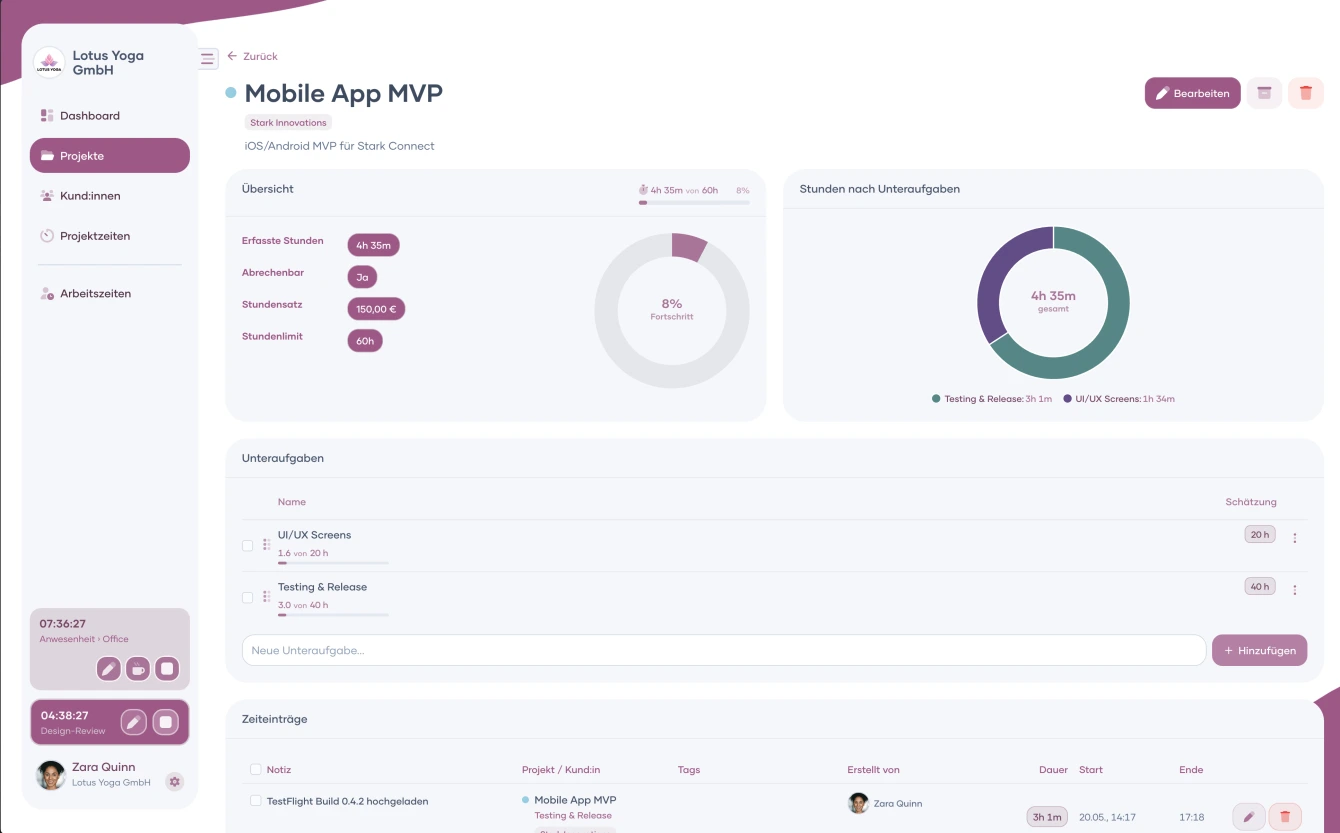
Attendance Tracking
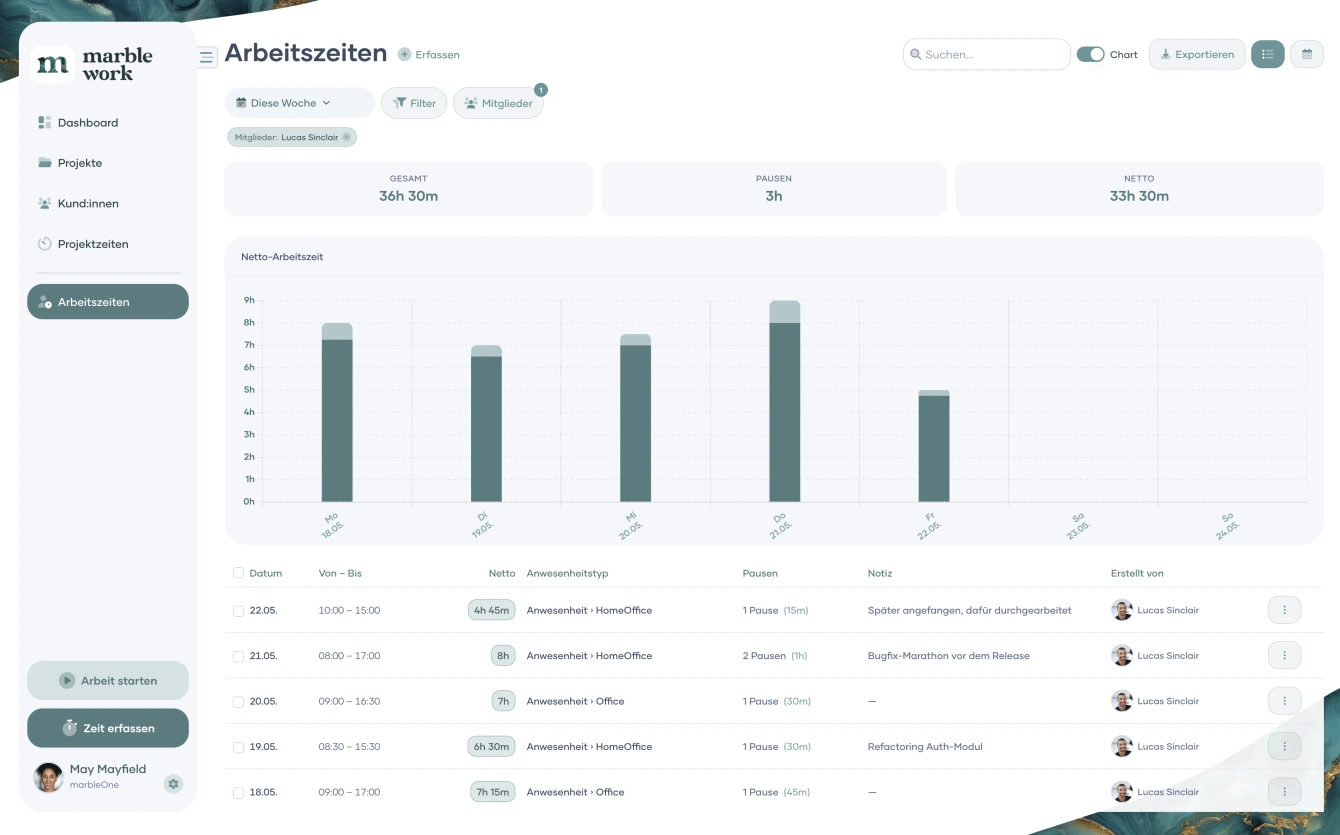
Log your start and end time with one click. Office, remote, vacation, sick leave – you define the categories and keep the overview.
Compliant Break Tracking
Document breaks completely and separately from working hours – in line with the EU Working Time Directive and the 2019 CJEU ruling. Automatic and effortless.
Individual Working Time Models
Set target hours per team member and let marble work compare actual vs. planned automatically. Part-time, full-time, changing contracts – all covered. (Feature coming soon)
Export for Accounting & HR
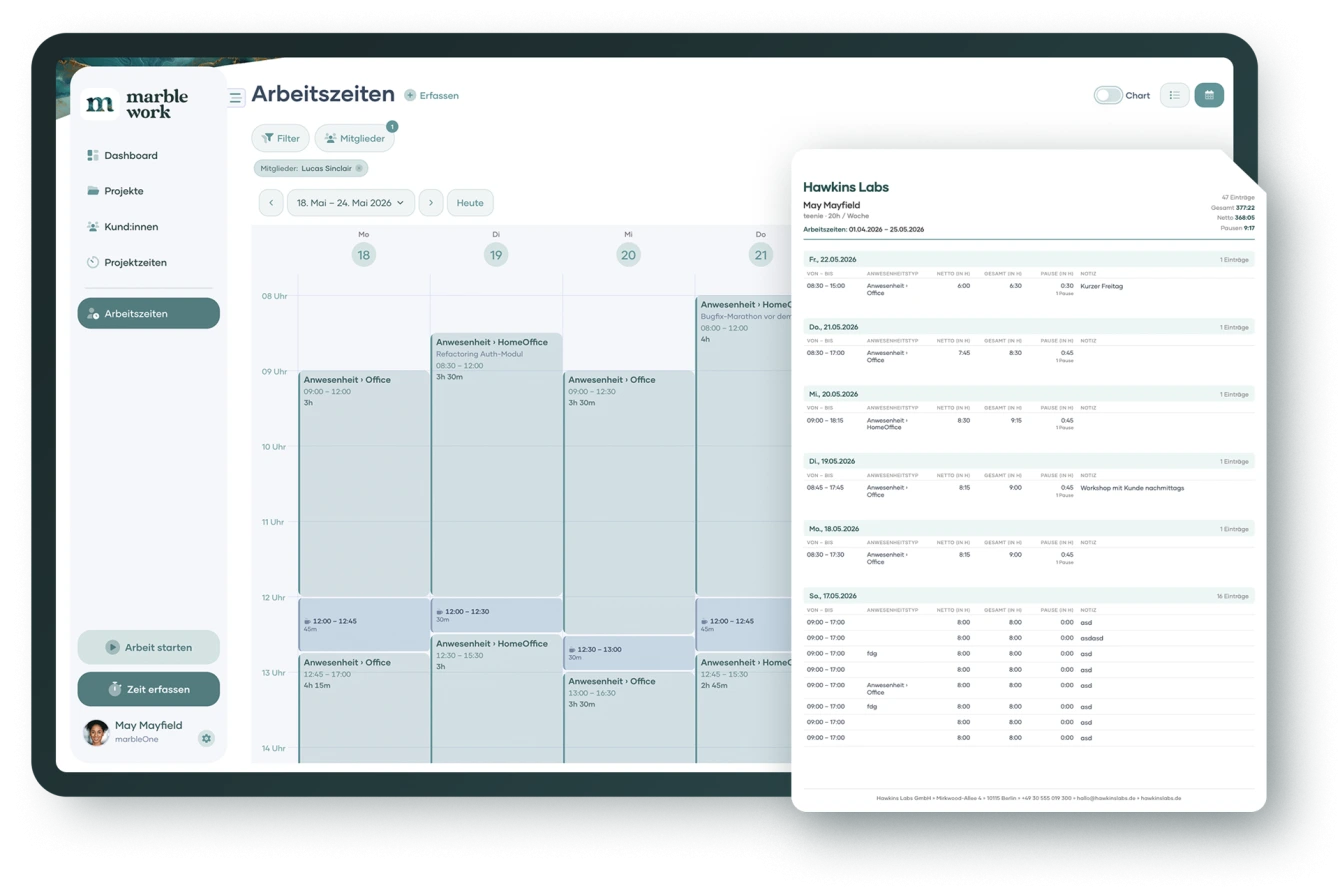
Structured work time reports for accountants, HR, and payroll – exported in seconds as a branded PDF.
Flexible & future-proof
Work time tracking and project time tracking – finally in one tool
Until now, you needed two tools: one for attendance, one for project hours. With marble work, that's over. Track working hours and project time in the same interface, view both in the calendar, and export print-ready reports in seconds.
Work time tracking becomes a clear, reliable process – not a daily chore.
Versatile & customisable
A work time tracking solution that adapts to the way you work – not the other way around
More control for your business: define attendance types, set up working time models, and keep track of your entire team.
Digital work time tracking has never been this easy to set up. With marble work, attendance, uninterrupted breaks, and reports all live in one place – customised exactly to your business needs.
Attendance Types
Office, remote, vacation, sick leave – or your own custom categories. You decide how attendance is recorded. Every entry is linked to a day and immediately visible in the calendar view.
Working Time Models
Set individual target hours per team member and let marble work calculate the variance automatically (Feature coming soon). Part-time schedules, rotating shifts, changing contracts – all captured, all transparent.
Calendar View
Work hours and project hours side by side, in a clear calendar view. Gaps and overlaps are visible at a glance – and can be corrected right away, without switching to another tool.
Export for Accounting & HR
Export structured work time reports in the right format – for your accountant, HR team, or payroll provider. No manual preparation, no data loss, no back-and-forth emails.
marble work subscription
Your digital work time tracking – get started today
The work time module is included in the Pro plan. Start for free and upgrade as your team grows. No setup fee, no hidden costs, no subscription complexity.
Monthly
Yearly (Save up to 20%)
Free
Your free start: projects, clients and time tracking, forever and without a credit card
€0
€0
/ Month
excl. VAT
Features
View features
- Up to 3 projects, 3 clients & 5 tags
- Up to 10 tasks per project
- Project time tracking with a timer or manually
- Work time tracking (solo) with a timer or manually
- Dashboard with 4 widgets, calendar & charts
- Export to CSV or Excel
- Web app plus iOS & Android
- 1 GB storage
- Member of unlimited organizations
Pro
For teams that run AI teammates, projects and time tracking in one place
€49
+ €12 for each additional memberi
€39
+ €9 for each additional memberi
/ Month
excl. VAT
Features
View features
- Everything from Free
- 3 AI teammates with their own model, skills & memory
- 4 connectors & 5 skills per AI teammate
- Task chains: AI steps & human approvals in one task
- Chat with your AI teammates
- Company knowledge every AI teammate knows
- 10 auto-starts per month
- Your own AI key: no credits, no markup
- Unlimited projects, clients & tasks
- Team invites, roles & project permissions
- Hour account, vacation & absences
- PDF export & custom labels
- All dashboard widgets
- 250 GB storage
Rocket
For agencies and teams without limits, with an open API
€89
+ €15 for each additional memberi
€69
+ €12 for each additional memberi
/ Month
excl. VAT
Features
View features
- Everything from Pro
- Unlimited AI teammates, connectors & skills
- Unlimited auto-starts
- REST API & MCP server: control marble work from outside
- Connect your own external Hermes agent
- Workspace color in your corporate design
- 500 GB storage
* Coming soon...
Help Center
Questions about work time tracking with marble work?
We've got answers.
Here you'll find answers to the most common questions about digital work time tracking with marble work – from breaks to exports to the Pro plan.
Subscription
How many team members can I invite?
In the Pro and Rocket plans there is no limit on team members (Payment per member). You invite new employees by email or add them manually and they are immediately ready to go. With roles and permissions you control exactly who can see and do what.
Subscription
Is my data stored securely and GDPR-compliant?
Yes. marble work is hosted in Germany and is GDPR (EU 2016/679)-compliant. Your data belongs to you and will never be passed on to third parties.
App
What types of reports does marble work offer?
The dashboard shows you at a glance which projects are active and how much time has been logged. On top of that, time trend charts across days, weeks, or months, and an interactive time distribution by project and client. All reports can be filtered by flexible date ranges and exported as CSV, Excel or PDF.
App
What happens to the data when a team member leaves the company?
All time entries of former employees are fully retained and can be evaluated. Not a single record is lost. You can still evaluate, export and bill time after they have left.
Subscription
Do I need to download an app to use marble work?
No. marble work runs directly in the browser, on any device, without installation. The interface is fully responsive and works equally on desktop, tablet and smartphone. All changes are synchronised in real time. BUT you're still welcome to download marble work for free from the App Store or Play Store onto your smartphone or tablet.
App
Does marble work support multiple languages?
Yes. marble work is available in English, German, and Spanish, ideal for international teams and clients.
Branding
How adaptable is marble work to my company's corporate design?
marble work adapts to your brand, not the other way around. Set your accent color and it carries through the entire interface. Rename projects, clients, and tasks to match your industry: a law firm calls them "matters" and "mandates," an agency calls them "jobs" and "brands." Time reports and exports carry your custom footer text, professional and ready to send.
Support
Does marble work offer onboarding or tutorials?
Yes, you can contact our sales team at any time and book a one-time free onboarding for marble work! This usually takes a maximum of one hour and shows you everything you need to know for an efficient start. In our Help Center, you will later also find video tutorials created by our team, in which you can get to know all the important functions of marble work step by step. Until then, you can search for answers in our FAQ section in the Help Center or contact our support team.
Always up to date
Don't want to miss any marble work updates?
Stay informed about new features and improvements – sign up for our newsletter now.